Use the WhatsApp pricing calculator to start your WhatsApp campaigns, reduce Cost-per-Conversation, and make every message count. Unlock the world’s most cost-effective marketing with 98% open rates with lower costs than CPC Ads, SMS, or traditional media.
The total WhatsApp message pricing is dynamic and determined by three primary factors: the template category (Marketing vs. Utility) and the specific country/region rate of the recipient.
User-initiated conversations where the business responds to a query.
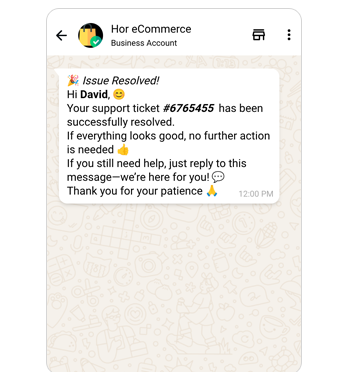
Resolving a support ticket, answering a product question, or handling a refund request.
*For all business initiated messages businesses must request the template as per the category above and require approval from Meta before starting campaigns.
WhatsApp Messaging Charges Calculator
🇮🇳 INR – Indian Rupee
🇺🇸 USD – US Dollar
🇪🇺 EUR – Euro
🇧🇷 BRL – Brazilian Real
iPlease specify how many Utility Template Messages you are likely to send in a month
iPlease specify how many Marketing Template Messages you are likely to send in a month
iPlease specify how many Authentication Template Messages you are likely to send in a month
iPlease specify how many Service conversations you are likely to have in a month. The first 1,000 Service conversations each month are free; only the messages above 1,000 are charged.
Plan Type
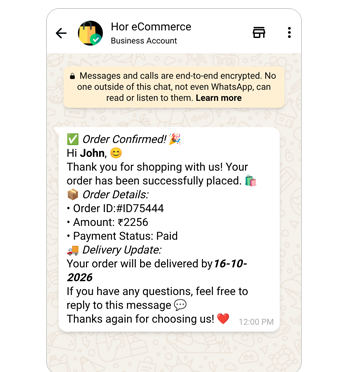
Utility
Marketing
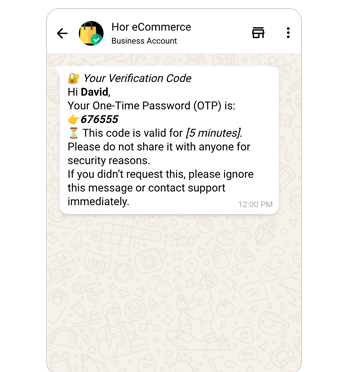
Authentication
Service
Total
i
We support billing only in 2 currencies INR (India) and USD (United States), you have the option to select the
billing currency during the free signup. WhatsApp revise the messaging price on every quarter.
Let chatbots handle the "admin work" of updating CRM statuses and collecting IDs or KYC documents.
Utility & Authentication (Low Cost)
These are considered "essential" communications. Meta keeps these rates low so businesses can replace expensive and less reliable SMS services.
Service (User Initiated)
If a customer messages first, you get 24 hours to reply. 1,000 service messages monthly are free per business phone number, then billed.
Picky Assist integration Vs Other Marketing Channels
In a world of crowded inboxes and expensive ad auctions, WhatsApp stands out as the most direct and cost-effective way to reach your customers. While Email and Print often go ignored and CPC Ads and SMS drive up your budget, WhatsApp delivers a 98% open rate at a fraction of the cost. It combines high-impact rich media with the instant nature of a personal chat, ensuring your message is seen and acted upon immediately.
Feature
WhatsApp
SMS
CPC Ads
Email
Print Media
Open Rate
98%
30%
Low
5-15%
Unmeasurable
Rich Media
Included (Video/Images)
Extra Cost (MMS)
Included
Included
Fixed (High Cost)
Two-Way Chat
Yes (Instant)
No (Usually)
No
Yes (Delayed)
No
Tracking
Real-time Data
Delivery Only
Clicks Only
Opens/Clicks
None (Guesswork)
Setup Cost
Zero / Low
Low
High (Bidding)
Low
Very High
Cost per Lead
Lowest
Moderate
High
Moderate
Highest
Opt-In Needed
Yes
Yes
No
Yes
No
WhatsApp API Pricing Calendar
To help businesses effectively plan for upcoming changes, a structured pricing calendar is followed for messaging on the WhatsApp Business Platform. Pricing updates may be introduced by Meta on the first day of each quarter; January 1, April 1, July 1, and October 1, allowing for up to four revisions per year. Any pricing changes are communicated in advance, with notice periods to align with the level of effort required to implement those updates.
Reduce Your WhatsApp Business Cost per Message
Go with the "Service Window"
Since the first 1,000 user-initiated replies per number monthly are free, encourage customers to ask questions. You can send Utility templates for free within an active 24-hour service window.
Use Click-to-WhatsApp Ads:
If a user reaches you through a Facebook or Instagram "Click-to-WhatsApp" ad, the resulting conversation is free for 7 days (previously 72 hours), if a business initiate conversation within 24 hours.
Watch for "Authentication-International" Traps
If you send OTPs to users outside your home country, the rates can be up to 20x higher than domestic rates. Always check the recipient's country code.
Frequently asked questions
How do I use the WhatsApp pricing calculator?
To get an accurate estimate, select your target country or region to pull the latest local rates. Then, input the estimated number of Marketing, Utility, or Authentication messages you plan to send each month. The tool will calculate your total Meta fees automatically.
What factors affect the WhatsApp message pricing calculation?
Your total costs are influenced by three main variables:
Category: Marketing messages (promotions) cost more than Utility (updates) or Authentication (OTPs).
Recipient Region: Rates are determined by the destination country’s rate card, not where your business is located.
Initiator: Business-initiated messages carry a per-message fee, while user-initiated replies are free within 24 hours window.
What is the difference between business-initiated and user-initiated messages?
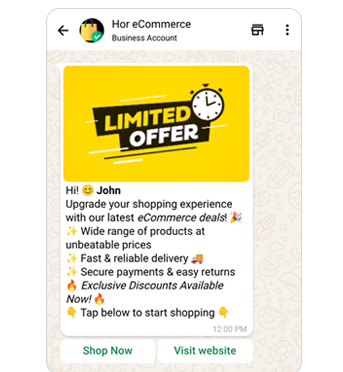
Business-Initiated: These are templates (like “Sale Starts Now!”) that you send to customers. These always incur a fee based on the category.
User-Initiated (Service): These happen when a customer messages you first. Replies in the 24-hour Service Window are free for 1,000 monthly messages, then billed.
Are incoming messages free?
Yes. You are never charged for receiving a message from a customer. Under the latest WhatsApp message pricing rules, charges only apply when you send a template message or respond outside of the free limits.
Can I use the calculator for multiple campaigns?
Absolutely. You can use the calculator to compare a high-volume Utility campaign (like shipping updates) against a targeted Marketing blast to see how category shifts impact your overall WhatsApp message pricing and budget.
Can I send bulk messages through WhatsApp Business API in India?
Yes, you can send bulk messages using the WhatsApp Business API by using pre-approved templates through Meta Official Partners like Picky Assist. Unlike the standard app, the API allows you to reach 250 to unlimited unique customers daily, provided you have explicit user opt-in to avoid account bans.
How can I integrate WhatsApp API with my CRM?
You can integrate the WhatsApp API with your CRM using native “plug-and-play” extensions. (like those for HubSpot or Zoho), no-code tools like Zapier. The process requires a verified Meta Business Manager and a Meta Business Partner like Picky Assist to sync customer data and automate message triggers. In 2026, most businesses prefer the WhatsApp Cloud API for direct, low-latency integration with their existing lead management workflows.
Is WhatsApp Marketing cheaper than SMS?
Yes. While the base cost per message may be similar, WhatsApp allows for rich media (images, videos, and PDFs) and interactive buttons without extra charges. You get better engagement for every cent spent.
How can I lower my WhatsApp campaign costs?
To keep costs at their “cheapest,” focus on free Service Conversations but never forget your monthly limits. Always stay focused on combining multiple messages where user input is necessary either by using WhatsApp flows or AI agents.
We’ve automated most of our client reminders and queries via WhatsApp. Our sales team now spends more time converting, not chasing. Picky Assist helped us reduce call center load by 40%.
Manoj VermaOps Head, SecureWealth Advisors
We’ve automated most of our client reminders and queries via WhatsApp. Our sales team now spends more time converting, not chasing. Picky Assist helped us reduce call center load by 40%.
Manoj VermaOps Head, SecureWealth Advisors
We’ve automated most of our client reminders and queries via WhatsApp. Our sales team now spends more time converting, not chasing. Picky Assist helped us reduce call center load by 40%.
Manoj VermaOps Head, SecureWealth Advisors
Ready to start the world’s most effective marketing?
Clients expect fast, clear communication. Don’t keep them waiting.
Give your team the tools to respond faster and sell smarter—with WhatsApp + CRM.











Manoj Verma Ops Head, SecureWealth AdvisorsWe’ve automated most of our client reminders and queries via WhatsApp. Our sales team now spends more time converting, not chasing. Picky Assist helped us reduce call center load by 40%.